
Dogly sends your customers a set of emails automatically, with your business name and logo, so you do not have to remember to write them. You can change the wording of every one of them.
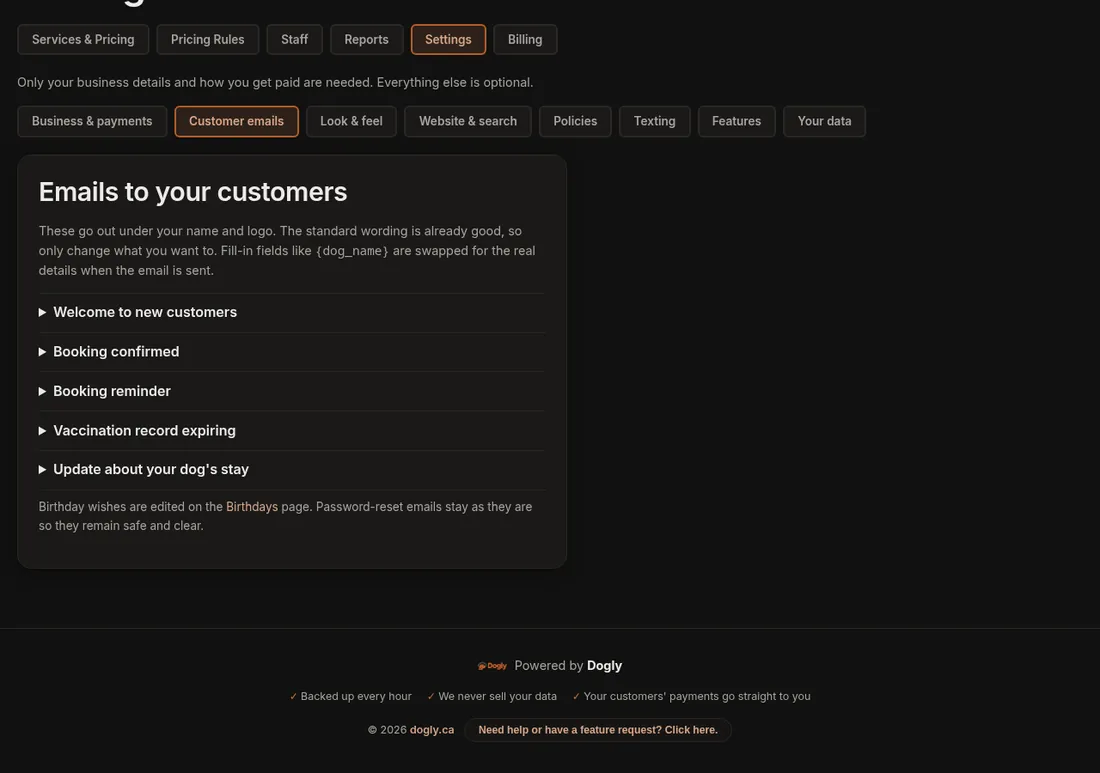
What gets sent
- A welcome email when a customer signs up, with an optional confirm-your-email step.
- A booking confirmation, and a booking alert to you.
- A booking reminder a day or two before a boarding, daycare, grooming, training or pet-sitting booking.
- Vaccination expiring notices.
- A review request a few days after a stay ends, if you turn it on. It is off until you do. See Reviews.
- Stay updates you post, birthday greetings, and notices for refunds, cancellations, payment links and waitlist spots.
- For repeat bookings: a confirmation of the whole series, a receipt each time a saved card is charged, and a notice if a card could not be charged.
- Password reset emails.
Change the wording
- Go to Settings → Customer emails.
- Open the email you want. Every email your customers receive is in the list: welcome, booking confirmed, booking reminder, vaccination expiring, review request, stay update, payment link, repeat booking confirmed, card charged (receipt), card could not be charged, booking cancelled, refund, spot opened up, booking date changed, set your password, password reset, email address changed, confirm your new email, and the newsletter confirmation.
- Edit the Subject and What it says. Leave a blank line to start a new paragraph, and put **two asterisks** around words to make them bold.
- Fill-in fields such as
{dog_name}are swapped for the real details when the email goes out. The ones available are listed under the box. - Press Save, or Save & email me a test to see the real thing in your inbox first.
An email you have changed shows an Edited tag, and Reset to standard brings the original wording back.
Good to know
- The birthday message is edited on the Birthdays page.
- Emails that come to you (a new booking, a new customer, a contact form message) are notifications for your team, so their wording is fixed. Password resets for your own staff logins come from Dogly.
- Emails show your business name as the sender. Replies go to your contact email, so keep that current. See Business details.
- Booking reminders go out for boarding, daycare, grooming, training and pet-sitting bookings.
If it does not work
- A customer says nothing arrived: ask them to check spam, and confirm the email on their account is correct.
- Your test email did not show up: check your own spam folder, and that the email on your owner account is right.
Want them to come from your own address? See Send emails from your own address.