
The tabs across the top of the screen (or along the bottom on a phone) are the places you will use every day. Here is what each one is for.
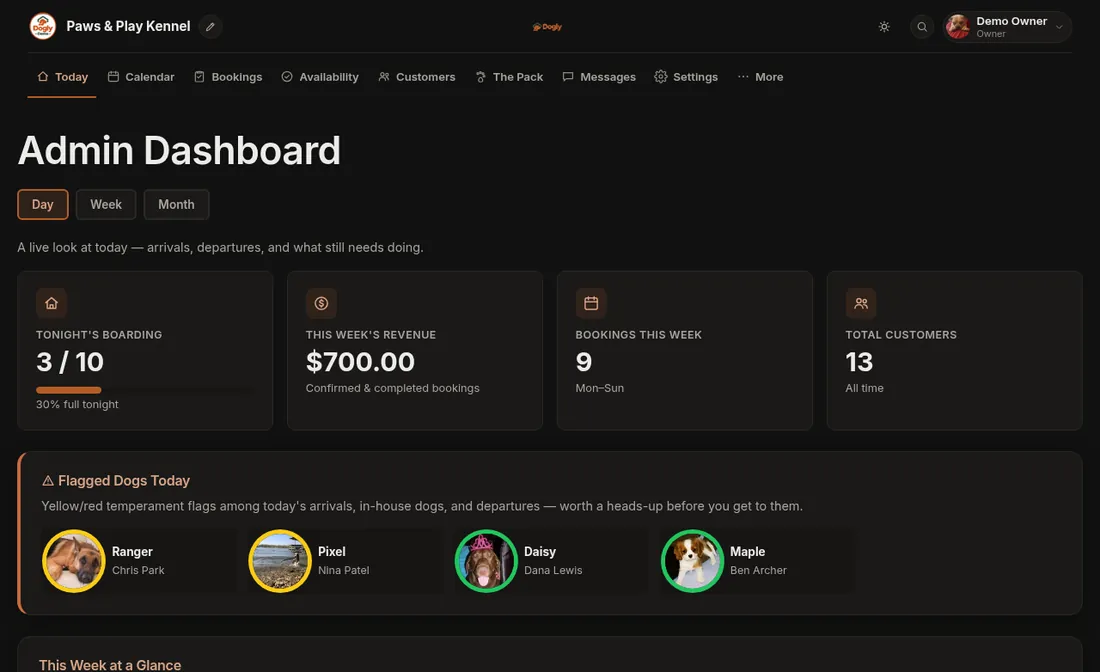
The daily tabs
- Today: your day at a glance. It shows tonight's boarding count, this week's bookings, dogs arriving, checking out and in for grooming, flagged dogs and the care checklist. The arrows let you look at other days.
- Calendar: the month, with a Week view alongside. See Calendar, week view and printable schedules.
- Bookings: every booking. Filter by status, take payment, change dates and post updates to the owner.
- Availability: how many dogs you can take each night, closed days and grooming time slots.
- Customers: your customer list and their dogs. Add, export and (for owners) import.
- The Pack: every dog, with photos, notes, colour flags and vaccination status.
- Messages: messages your customers send from their account.
Under More
- Marketing: gallery, reviews, newsletter, blog and birthdays.
- Help and Dogly Support: this guide, and a way to open a ticket with us.
- Pages (owner): edit the text on your home, About, services, gallery, reviews and contact pages, and how you appear in search.
- Business (owner): services, pricing rules, staff, reports and billing.
Owners also have a Settings tab (the gear) for payments, look and feel, emails, texting, features and your data. On a phone, tap Menu at the bottom to reach everything that is not on the bar.
The top bar
- The magnifying glass opens search. See Searching everything.
- The round moon or sun icon switches between dark and light mode.
- Your name and photo open a menu with My Profile, Settings (owners), Visit Website and Log Out.
Good to know
- The stat cards on Today only show on today's date. The revenue card is for owners.
- If a booking is waiting on payment, a box on Today tells you how many and links to them.
- Owners see a Getting Started box on Today until the basics are set up.
- Staff accounts can use the daily tabs but not the owner-only pages. See Owner and staff: who can do what.