
A customer wants to come a day later, or stay longer? You can move the booking instead of cancelling it, so the payment and history stay with it.
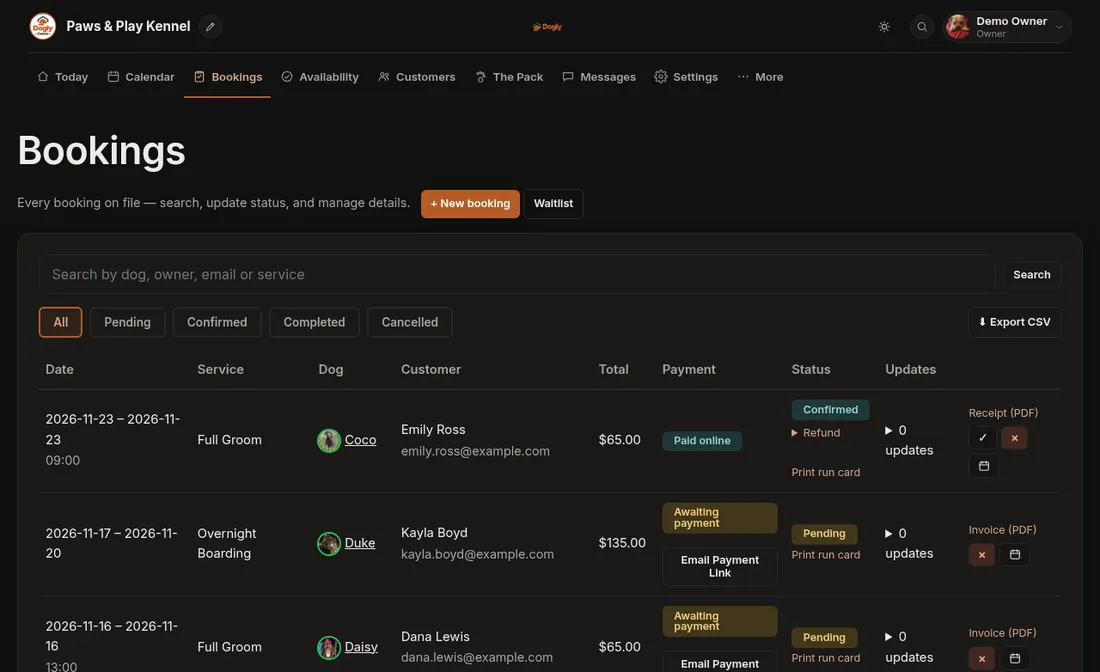
- Click Bookings and find the booking.
- Press the calendar button on its row (Change dates).
- Pick the new date. For boarding, choose the new check-in and check-out dates. The check-out box starts on the old date, so change both to keep the same number of nights. For daycare pick the new day. For grooming pick a new day and then an open time.
- Leave Email the customer about the change ticked if you want them told, then press Move booking.
Good to know
- The price stays the same unless the number of nights changes, you tick Recalculate the price from my pricing rules, or you type your own price.
- Full or closed dates cannot be chosen.
- If the move fails, the booking is left exactly as it was, so nothing gets lost.
If it does not work
- You want to change the service or the dogs. Cancel the booking and make a new one. See Cancel a booking.
- It is a multi-dog booking. These cannot be moved. Cancel and rebook them.