
The Pack lists every dog across all your customers. Open a dog's card to see everything about them, flag how they behave, and edit their details. Customers can also edit their own dog's profile from their account.
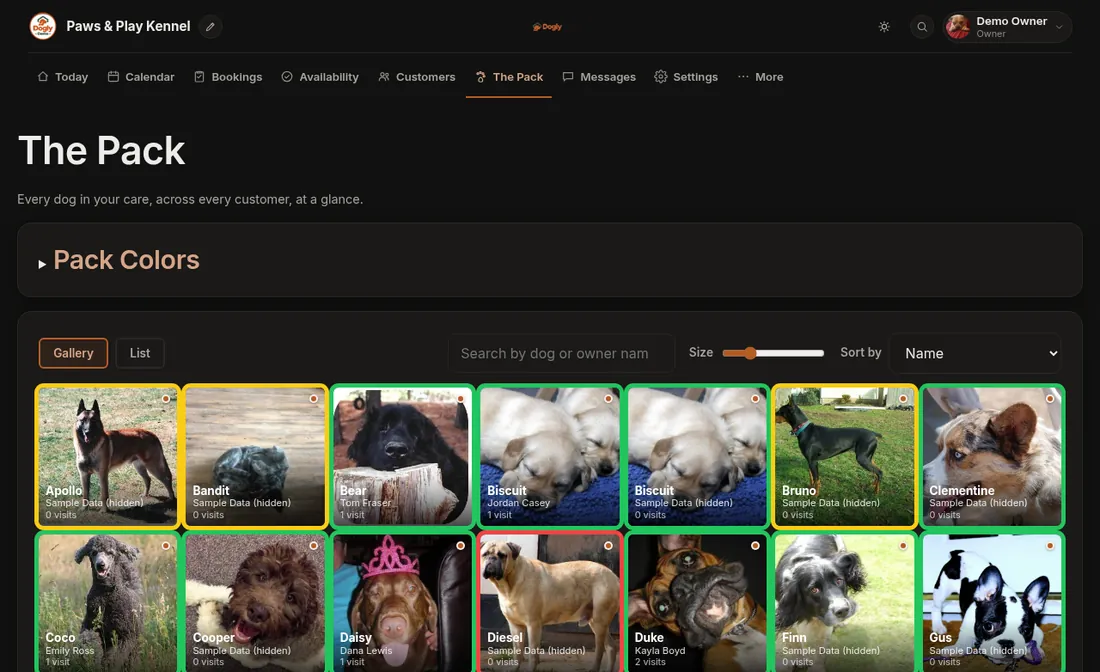
Find your way around
- Open The Pack in the top bar.
- Switch between Gallery (photo tiles) and List (a table).
- Type a dog's or owner's name in the search box, or change Sort by (Name, Owner, Breed, Age, Newest, Vaccination Expiry or Temperament Color).
- Tap a dog to open its card.
Each dog also shows how many visits it has had (completed bookings). A small dot or badge shows its vaccination status, if you require vaccinations or the record is current.
On a dog's card
- Photo (change it with the file picker), breed, weight, birthday and age
- Feeding, medication, special needs, temperament and favourites
- Vet and emergency contact
- Vaccination expiry date, notes and an uploaded record (photo or PDF)
- Temperament flag: press a colour to flag the dog, or the cross to clear it
- Tags such as "Bite risk" (type one and add it) and Staff Notes, which customers never see
- Edit Profile with Save Changes at the bottom
Temperament colours
A colour flag puts a ring around the dog's photo everywhere in the dashboard, so staff see at a glance who needs a calm approach or separate play. You choose what each colour means: owners open Pack Colors at the top of The Pack (or Settings → Look & feel). You can have up to five, and customers never see them. See Flag a dog with a colour.
Printable cards
- Pet Card and PDF on the dog's card: a one-page summary with photo and key details.
- Print run card on a booking in Bookings: a card for the kennel door with temperament, care notes, medical, vaccinations and the vet contact. Turn it on or off in Settings → Features.
Dogly emails owners before a vaccination record expires, if you require records. See Vaccinations.