
Dogly has a lot of tools, and you do not need all of them. Features is where you switch each one on or off, so your menus only show what you use. Turning something off only hides it. Nothing you have already entered is deleted.
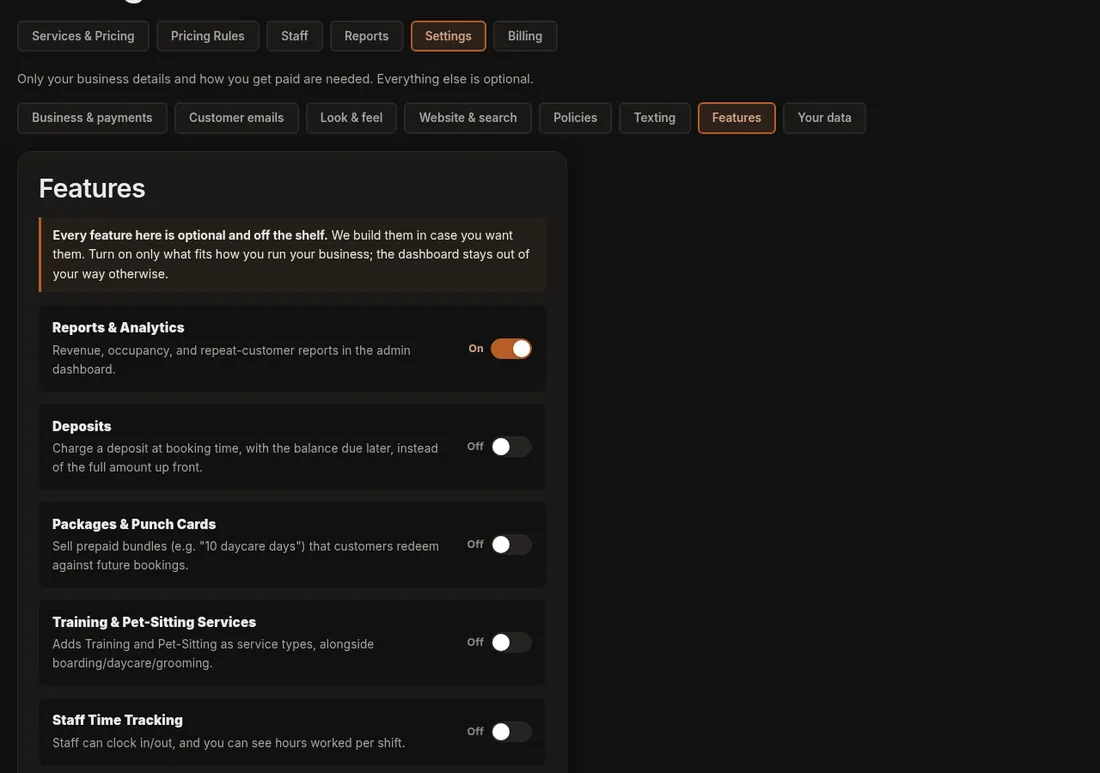
Two ways to switch a tool
- In Settings: click Settings, then Features. Each tool has an On/Off switch. After changing switches, press Save Features.
- On the tool's own page: a strip under the page title says something like Blog is on with a Turn off button (or Turn on if it is off). It changes straight away. If a tool is off, its page explains that and has the same Turn on button, so you never hit a dead end.
Both places are always in step with each other.
What is on the list
- Reports & Analytics: revenue and booking reports (on by default).
- Deposits: take part of the price when booking.
- Packages & Punch Cards: prepaid bundles.
- Training & Pet-Sitting Services: extra service types. Customers can book training (a day and a time, price per session) and pet-sitting (a first and last day, price per day) online.
- Staff Time Tracking: clock in and out, plus optional Timesheets for payroll prep (hours, overtime and estimated wages for a pay period, not payroll).
- Capacity Groups: separate space by run type.
- Printable Run Cards: kennel-door cards (on by default).
- Two-Way Texting: customers text you and you reply from the dashboard.
- Your First Visit page: a page answering what to bring, vaccinations, drop-off and pick-up, and what a day looks like (off until you switch it on).
- Meet the Team: a page with a photo, role and short bio for each person (off until you switch it on).
- Webcams: live camera feeds for customers.
- Multiple Locations: label services by location.
- Newsletter: sign-up forms, a public Newsletter page and sending newsletters by email (off until you switch it on). Off hides them and pauses sending, and your subscribers and past issues are kept.
- Recurring Bookings: customers and staff can repeat a booking weekly, every 2 weeks or monthly, up to 12 visits (off until you switch it on). Saving a card for later charges is a separate tick-box under Settings, Business & payments. See Set up saved cards and repeat bookings.
- Blog: news posts on your site (on by default).
- Reviews: customer reviews and star ratings (on by default). Off hides the Reviews page and menu link, and the reviews on your home page.
- Photo Gallery: the Gallery page and its links (on by default). Your photos are kept.
- Birthday Greetings: upcoming birthdays and the automatic birthday message (on by default). Off stops the messages.
- Add-ons on Grooming Bookings: lets customers add your add-ons when booking grooming (on by default).
If it does not work
- If a menu item or setting you expect is missing, the feature behind it is probably off.
- If your switches did not stick in the Settings list, make sure you pressed Save Features.
Related: Turn a feature on or off and Finding things in Settings.