
Dogly comes with optional tools that stay out of your way until you want them. Turning one on adds its page to your dashboard, and turning it off tucks it away again.
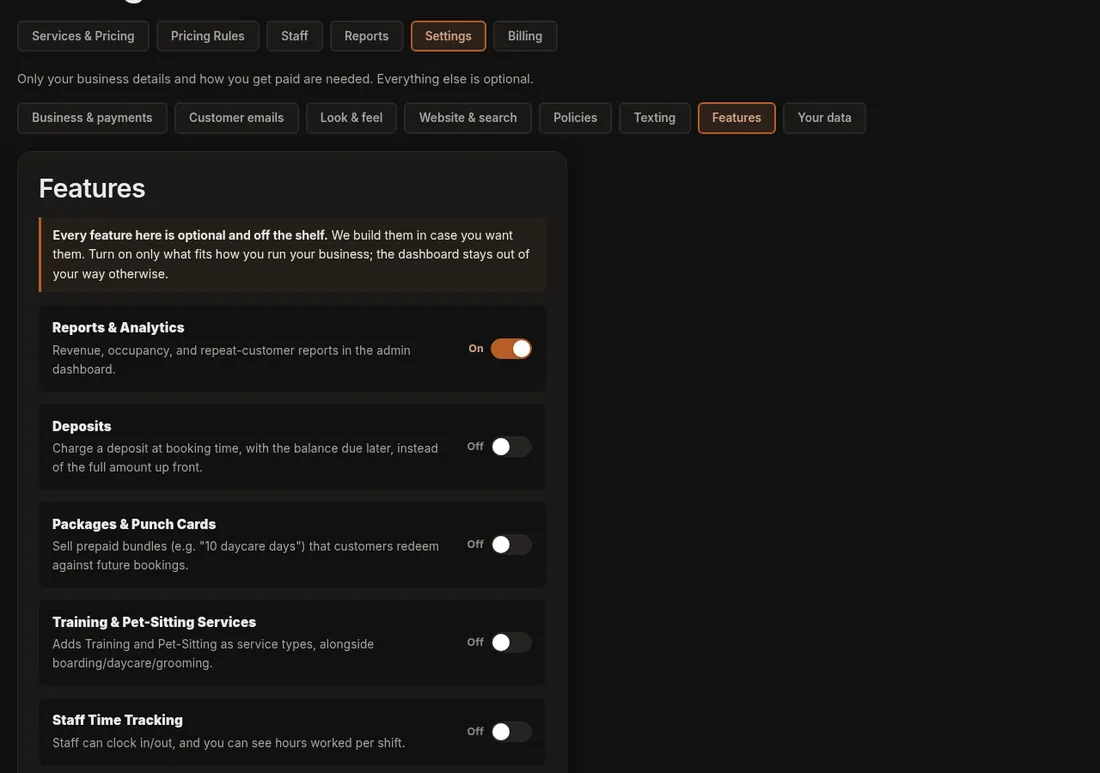
- Click Settings, then open the Features tab.
- Switch on the ones you want to use and switch off the ones you do not.
- Press Save Features. A green "Saved." appears.
Some pages also have a small bar at the top that says, for example, "Packages & Punch Cards is off" with a Turn on button. Pressing it does the same thing without a trip to Settings.
Good to know
- Turning something off only hides it. Nothing you entered is lost, and it is all back when you turn it on again.
- Off to begin with: Deposits, Packages & Punch Cards, Training & Pet-Sitting Services, Staff Time Tracking, Capacity Groups, Two-Way Texting, Webcams, Multiple Locations, Newsletter and Recurring Bookings.
- On to begin with: Reports & Analytics, Printable Run Cards, Reviews, Photo Gallery, Birthday Greetings, Add-ons on Grooming Bookings and Blog.
- Training and pet-sitting services can be booked online once you turn them on. Training uses time slots you add under Availability, and pet-sitting is a price per day with no limit on how many you take.
- Only the owner sees these switches.
If it does not work
- A menu item is missing. Its feature is probably off. Turn it on and save.
- Your change did not show. Make sure you pressed Save Features at the bottom of the list.
More: Turning features on and off.