
When someone searches for a kennel near them, Google shows a blue title and a short description for each result. You can write yours, so people see something clear and friendly instead of whatever Google guesses.
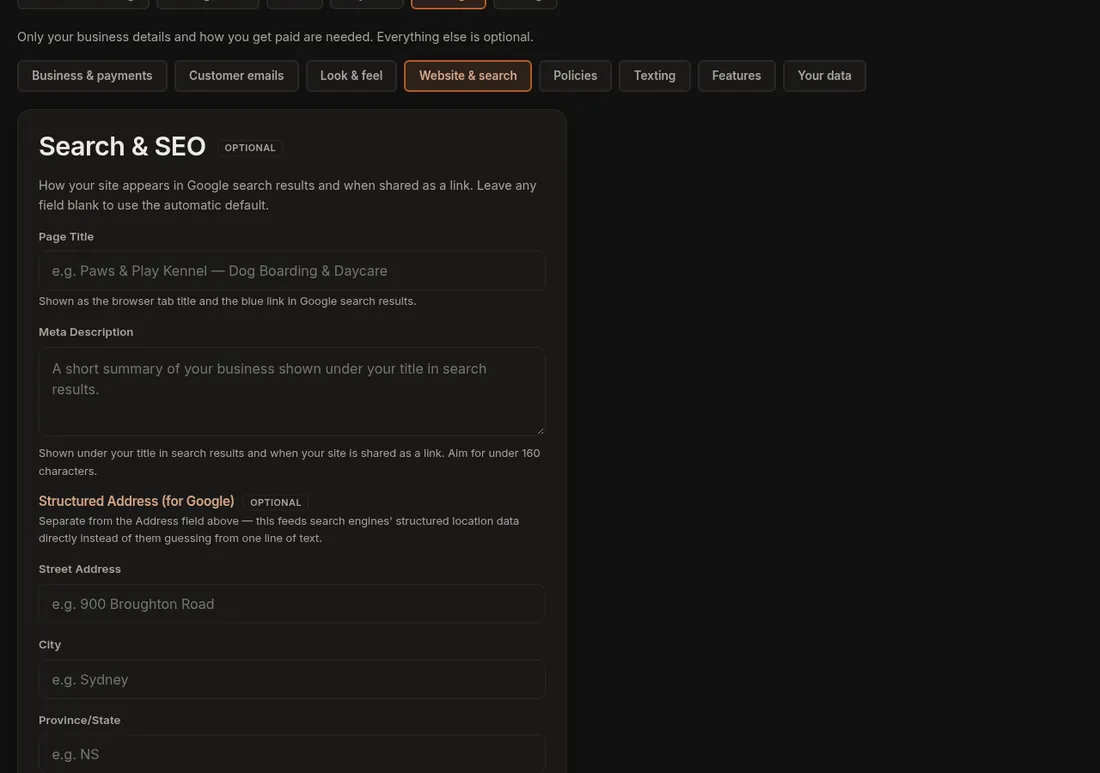
- Click Settings and open the Website & search tab. Find the Search & SEO panel.
- Write a Page Title, for example "Dog Boarding & Daycare in Truro, NS". It can be up to 70 characters.
- Write a Meta Description of one or two sentences, up to 160 characters. Say where you are and what you do.
- Under Structured Address (for Google) fill in street, city, province, postal code and country code (CA for Canada). Google uses this to place you on the map and in local results.
- Press Save Search & SEO. A line says Search & SEO settings saved.
Want different wording for your other pages? Click More, then Pages, then Search appearance. Each main page has its own title and description, with a preview of how it will look in Google. Leave a box empty and Dogly writes a sensible one from your business name and address.
Good to know
- Your site already has the technical bits Google likes: a sitemap, page titles and sharing previews. You do not need to set those up.
- Things that help the most: real photos with captions in your Gallery, a short blog post now and then, happy customers leaving reviews, and your own web address (see Connect your own domain).
- Google can take days or weeks to notice a change. That is normal, so do not worry if nothing moves tomorrow.
If it does not work
- The old title still shows in Google: Google has not looked at your site again yet. Give it a few weeks.
- Your text looks cut off: titles over about 60 characters and descriptions over about 155 can be shortened by Google. Trim them.
Related: Change what Google shows for my business, Editing your pages.