
The Pages area is where you change what visitors read on your site. The layout stays the same, so you only worry about the words.
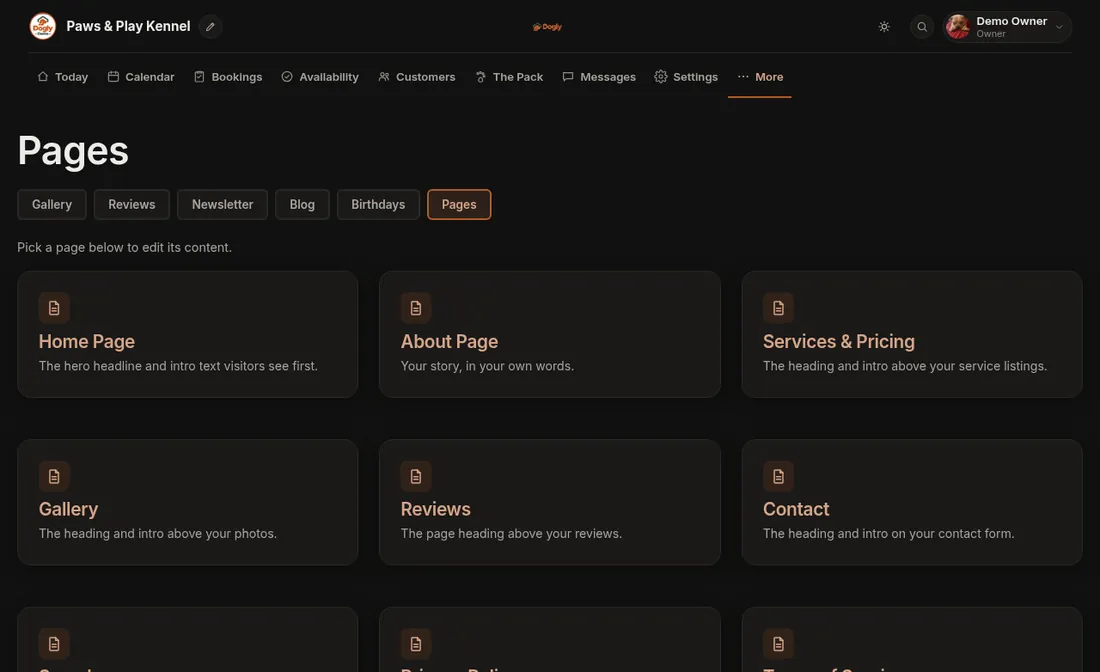
- Click More and then Pages. You will see a card for each page.
- Click the page you want to edit.
- Change the text and press Save. You will see a message such as Home page saved.
What each page lets you change
- Home Page: the small line above the headline, the headline and the subtext, plus a Welcome section with the text toolbar that shows under the hero. You can also choose which sections show and in what order, and set an Announcement bar for things like holiday hours.
- About Page: the whole page, with the toolbar (bold, italic, headings, lists, links and pictures).
- Services & Pricing, Gallery, Reviews, Contact (and Webcams when that feature is on): four things: Page Heading, Intro Text, Page text (with the toolbar, shown above the list, photos, reviews or form) and Text below the content (also with the toolbar). Services, prices and photos themselves are managed elsewhere.
- Search appearance: the title and description Google shows for your pages.
- Privacy Policy and Terms of Service: you cannot rewrite these, but you can add a note of your own at the end.
Good to know
- Changes show on your public site as soon as you press Save.
- To format text, click inside a toolbar box and use the buttons above it: bold, italic, underline, headings, bullet or numbered list, quote, link and picture. Leave Page text or Text below the content empty and nothing extra appears on the page.
- Layouts are fixed (you choose one of 9 templates under Settings), and you cannot add extra custom pages. This is text editing, not a drag-and-drop page builder.
- For Heading and Intro Text, leaving the box empty brings back the default wording. The default is shown in grey so you can see what visitors will read.
- Only the owner can edit pages. Staff do not see this area.
Related: Change the words on my home page, Put a notice at the top of my site, Write my About page, Being found on Google.