
Customers must sign your waiver before their first booking. They type their name to sign, and Dogly keeps the record with the date, time and where it was signed from, so you do not need paper at the door.
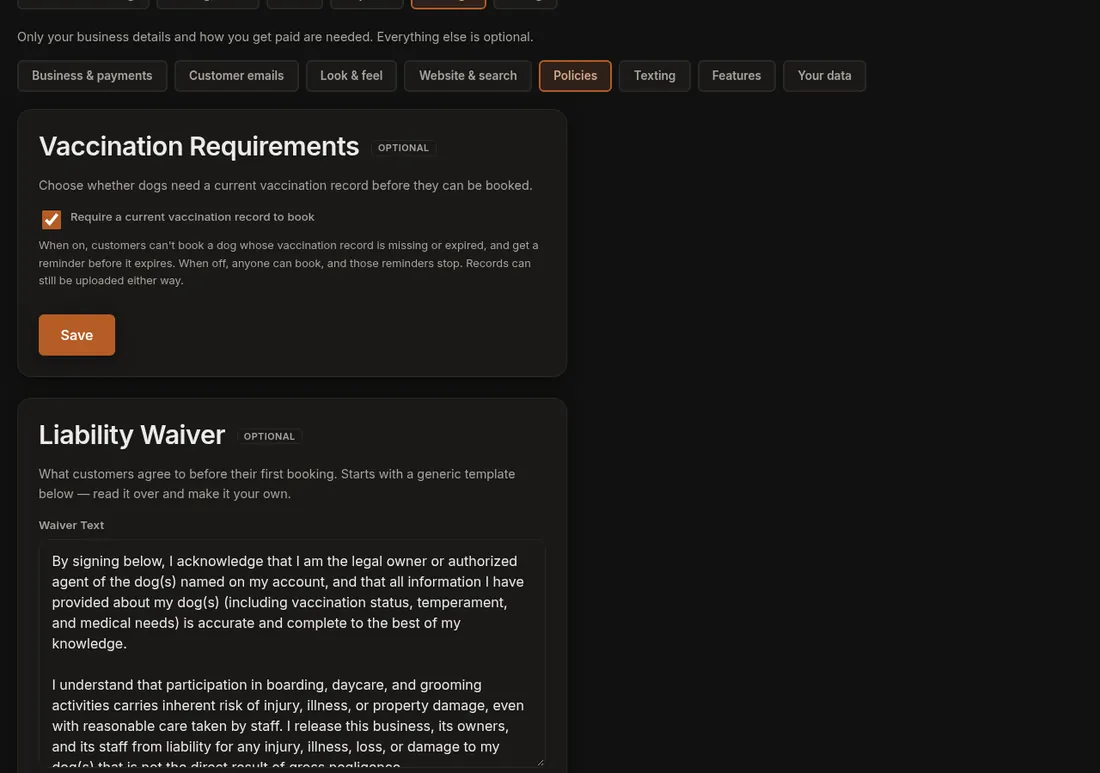
- Click Settings (the gear), then the Policies section.
- Find Liability Waiver. It starts with a generic template. Read it over and make it your own in the Waiver Text box.
- Press Save Waiver. A message says "Waiver saved."
When you change the wording
Customers who already signed stay signed. If you make a real change that everyone must agree to, tick Require every customer to sign again before you save. The box shows the version number you are on. Use it only for meaningful changes, not typo fixes, because every customer will be asked to sign again at their next booking.
Good to know
- A signature belongs to the customer account, not to each dog, so a customer with three dogs signs once.
- A booking cannot go ahead until the customer has signed the current version.
- Dogly provides the place to sign and keeps the record. It is not legal advice, so have your wording reviewed by someone who can advise you.
- Only the account owner can edit the waiver.
If it does not work
- If a customer is asked to sign again unexpectedly, the re-sign box was probably ticked on a recent save.
- If your edits do not show, make sure you pressed Save Waiver and not another Save button on the page.
Related: Edit your waiver and Vaccination rules.